


VLAN CONFIGURATION CISCO SWITCH 2025

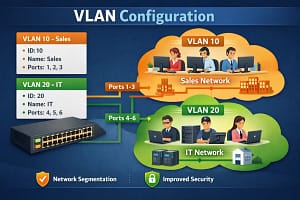
If you’re working in networking, understanding how to segment a network using VLANs is one of the most important skills you can master.
In today’s example, we’ve divided a switch into three departments — HR, Accounts, and IT — each assigned a dedicated VLAN (10, 20, and 30).
This ensures better security, reduced broadcast traffic, and cleaner network management.
🔹 VLAN 10 – HR
🔹 VLAN 20 – Accounts
🔹 VLAN 30 – IT Department
Each VLAN is created with proper naming, and interfaces are configured as access ports to ensure devices join the correct department’s network.


Why this matters?
✅ Improved network performance
✅ Stronger segmentation & isolation
✅ Easier troubleshooting
✅ Enhanced security between departments
If you’re learning networking, VLANs are a must-know topic — and mastering them takes your skills to the next level!
👉 💬 Which VLAN configuration do you want me to explain next — Trunk Ports, Inter-VLAN Routing, or Native VLAN? Comment below!
hashtagNetworkingWithIsrar hashtagNetworkingBasics hashtagCisco hashtagVLAN hashtagITLearning hashtagCCNA hashtagNetworkEngineering hashtagTechEducation hashtagLearnNetworking hashtagnetworkingwithisrar hashtagnetworkengineer hashtagNetworkingBasics hashtagITInfrastructure hashtagCCNA hashtagroutingandswitching


Below is a complete, updated 2025 guide on VLAN Configuration on Cisco Switches, written in clear technical English, suitable for blog posts, interview preparation, CCNA/Network students, and IT support engineers.

VLAN Configuration on Cisco Switch (2025 Guide)
Introduction to VLAN
VLAN CONFIGURATION CISCO SWITCH 2025A VLAN (Virtual Local Area Network) is a logical segmentation of a physical network. VLANs allow network administrators to divide a single switch into multiple broadcast domains, improving security, performance, and network management.
In modern enterprise networks (2025), VLANs are essential for:
- Traffic isolation
- Reducing broadcast storms
- Enhancing security
- Simplifying network administration
Cisco switches provide robust VLAN configuration using Cisco IOS CLI.
Why VLANs Are Important in 2025
- Supports hybrid work environments
- Improves network scalability
- Enhances Zero Trust security models
- Optimizes cloud and data center connectivity
- Reduces network congestion
VLAN Types in Cisco Switches
| VLAN Type | Description |
|---|---|
| Default VLAN | VLAN 1 (exists by default) |
| Data VLAN | Used for user data traffic |
| Management VLAN | Used for switch management |
| Voice VLAN | Optimized for VoIP traffic |
| Native VLAN | Used on trunk ports |
| Private VLAN | Used for advanced isolation |
VLAN ID Range
- Normal Range: 1 – 1005
- Extended Range: 1006 – 4094
⚠️ Best practice in 2025: Avoid using VLAN 1 for user traffic
Basic VLAN Configuration on Cisco Switch
Step 1: Enter Global Configuration Mode
enable
configure terminal
Step 2: Create VLANs
vlan 10
name HR
exit

vlan 20
name FINANCE
exit

vlan 30
name IT
exit
Assign Ports to VLANs (Access Mode)
Example: Assign Port FastEthernet0/1 to VLAN 10
interface fastethernet0/1
switchport mode access
switchport access vlan 10
exit
Repeat for other ports as needed.
Verify VLAN Configuration
show vlan brief
Sample Output:

VLAN Name       Status    Ports
10   HR         active    Fa0/1
20   FINANCE    active    Fa0/2
30   IT         active    Fa0/3
Configure Trunk Port Between Switches
Trunk ports carry traffic from multiple VLANs.
Configure Trunk Interface
interface gigabitethernet0/1
switchport mode trunk
switchport trunk allowed vlan 10,20,30
exit
Native VLAN Configuration (Security Best Practice)
interface gigabitethernet0/1
switchport trunk native vlan 99
exit
Configure Management VLAN (2025 Standard Practice)
vlan 99
name MANAGEMENT
exit

interface vlan 99
ip address 192.168.99.10 255.255.255.0
no shutdown
exit
Inter-VLAN Routing (Router-on-a-Stick)
VLANs cannot communicate without a Layer 3 device.
Router Configuration Example
interface gigabitethernet0/0.10
encapsulation dot1Q 10
ip address 192.168.10.1 255.255.255.0

interface gigabitethernet0/0.20
encapsulation dot1Q 20
ip address 192.168.20.1 255.255.255.0
VLAN Configuration on Layer 3 Switch (SVI)
interface vlan 10
ip address 192.168.10.1 255.255.255.0
no shutdown

ip routing
VLAN Security Best Practices (2025)
- Do not use VLAN 1 for users
- Disable unused switch ports
- Assign unused ports to an unused VLAN
- Use separate VLANs for Voice and Data
- Change native VLAN from default
- Enable port security
- Use VLAN ACLs (VACLs)
Troubleshooting VLAN Issues
| Command | Purpose |
|---|---|
| show vlan | Check VLAN status |
| show interfaces trunk | Verify trunk links |
| show running-config | Check configurations |
| show ip interface brief | Verify SVI status |
Common VLAN Configuration Errors
- Port not assigned to correct VLAN
- Trunk allowed VLAN mismatch
- Native VLAN mismatch
- VLAN not created before assignment
- Inter-VLAN routing not enabled
VLAN Configuration Interview Questions (2025)
- What is a VLAN?
- Difference between access and trunk ports?
- What is native VLAN?
- What is VLAN hopping?
- How does inter-VLAN routing work?
- Difference between SVI and router-on-a-stick?
Conclusion
VLAN configuration on Cisco switches remains a core networking skill in 2025. Proper VLAN planning improves security, performance, and scalability in enterprise and cloud-connected networks. Mastering VLANs is essential for CCNA, CCNP, and real-world network administration.
PLEASE SUBSCRIBE MY WEBSITE TO CLICK HERE





