


Access control List (ACL)
standard Acl List configuration two routers with commands 2025
standard Acl List configuration two routers with commands 20252 types standard and extended. Standard is used to permit or deny network and extended is used to permit or deny service or port number. Standard uses <1-99> as access list number & extended uses <100-199> as access list number. Filtering is done mainly on source.
Below is a complete, step-by-step guide on how to configure Access Control Lists (ACL) on two routers connected with a serial cable, including network design, IP addressing, ACL concepts, and Cisco IOS commands.
This guide is written in simple language, suitable for students, beginners, and networking interviews (2025).
🔐 ACL Configuration on Two Routers Using Serial Cable (2025)
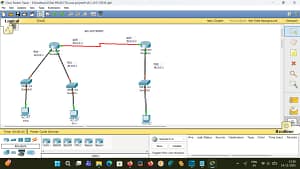

ACL LIST CONFIGURATION TWO ROUTERS WITH SERIAL CABLE WITH COMMANDS 2025
📌 What You Will Learn
standard Acl List configuration two routers with commands 2025
- What is ACL (Access Control List)
- Types of ACL (Standard & Extended)
- Network topology for two routers with serial cable
- IP addressing plan
- Step-by-step router configuration
- ACL configuration with commands
- Verification and troubleshooting
1️⃣ What is an ACL (Access Control List)?
standard Acl List configuration two routers with commands 2025
An ACL (Access Control List) is a set of rules used on routers to:
- Allow or deny traffic
- Control who can access what
- Improve network security
ACLs work based on:
- Source IP
- Destination IP
- Protocol (IP, TCP, UDP, ICMP)
- Port numbers (HTTP, FTP, SSH, etc.)
2️⃣ Types of ACL
standard Acl List configuration two routers with commands 2025
🔹 1. Standard ACL
- Filters traffic based only on source IP
- Number range:
- 1–99
- 1300–1999
- Less secure
- Applied near destination
🔹 2. Extended ACL (Recommended)
- Filters traffic based on:
- Source IP
- Destination IP
- Protocol
- Port number
- Number range:
- 100–199
- 2000–2699
- More secure
- Applied near source
👉 In this guide, we will use Extended ACL (best practice).
3️⃣ Network Topology (Two Routers with Serial Cable)
standard Acl List configuration two routers with commands 2025
PC1 ---- Router1 ----(Serial Cable)---- Router2 ---- PC2
🔹 Devices Required
- 2 Routers (Cisco)
- 1 Serial DCE/DTE Cable
- 2 PCs
- 2 Ethernet cables
4️⃣ IP Addressing Plan
🔹 LAN 1 (Router1 Side)
- Network:
192.168.1.0/24 - Router1 FastEthernet:
192.168.1.1 - PC1:
192.168.1.10
🔹 Serial Link
- Network:
10.0.0.0/30 - Router1 Serial:
10.0.0.1 - Router2 Serial:
10.0.0.2
🔹 LAN 2 (Router2 Side)
- Network:
192.168.2.0/24 - Router2 FastEthernet:
192.168.2.1 - PC2:
192.168.2.10
5️⃣ Basic Configuration of Router1
standard Acl List configuration two routers with commands 2025
🔹 Enter Privileged Mode
Router> enable
Router# configure terminal
🔹 Set Hostname
Router(config)# hostname R1
🔹 Configure LAN Interface
R1(config)# interface fastEthernet0/0
R1(config-if)# ip address 192.168.1.1 255.255.255.0
R1(config-if)# no shutdown
R1(config-if)# exit
🔹 Configure Serial Interface
R1(config)# interface serial0/0/0
R1(config-if)# ip address 10.0.0.1 255.255.255.252
R1(config-if)# clock rate 64000
R1(config-if)# no shutdown
R1(config-if)# exit
6️⃣ Basic Configuration of Router2
standard Acl List configuration two routers with commands 2025
🔹 Enter Configuration Mode
Router> enable
Router# configure terminal
Router(config)# hostname R2
🔹 Configure LAN Interface
R2(config)# interface fastEthernet0/0
R2(config-if)# ip address 192.168.2.1 255.255.255.0
R2(config-if)# no shutdown
R2(config-if)# exit
🔹 Configure Serial Interface
R2(config)# interface serial0/0/0
R2(config-if)# ip address 10.0.0.2 255.255.255.252
R2(config-if)# no shutdown
R2(config-if)# exit
7️⃣ Configure Static Routing (Required)
🔹 On Router1
R1(config)# ip route 192.168.2.0 255.255.255.0 10.0.0.2
🔹 On Router2
R2(config)# ip route 192.168.1.0 255.255.255.0 10.0.0.1
8️⃣ Testing Without ACL
From PC1, ping PC2:


ping 192.168.2.10
✅ Ping should be successful
9️⃣ ACL Requirement (Scenario)
👉 Block PC1 (192.168.1.10) from accessing PC2 (192.168.2.10)
👉 Allow all other traffic
🔟 Extended ACL Configuration (Router1)
standard Acl List configuration two routers with commands 2025


🔹 Create Extended ACL
R1(config)# access-list 100 deny ip host 192.168.1.10 host 192.168.2.10
R1(config)# access-list 100 permit ip any any
🔹 Apply ACL to Interface (Outbound)
R1(config)# interface serial0/0/0
R1(config-if)# ip access-group 100 out
R1(config-if)# exit
📌 Why outbound?
Traffic is leaving Router1 toward Router2.
1️⃣1️⃣ Verify ACL Configuration
🔹 Show ACL
R1# show access-lists
🔹 Show Interface ACL
R1# show ip interface serial0/0/0
1️⃣2️⃣ Testing After ACL
❌ From PC1 to PC2
ping 192.168.2.10
❌ Ping will fail (Blocked)
✅ From Other Devices
Other PCs (if any) will work normally.
1️⃣3️⃣ Blocking Specific Services (Example: HTTP Only)
R1(config)# access-list 101 deny tcp 192.168.1.0 0.0.0.255 192.168.2.0 0.0.0.255 eq 80
R1(config)# access-list 101 permit ip any any
Apply:
R1(config)# interface serial0/0/0
R1(config-if)# ip access-group 101 out
1️⃣4️⃣ Removing ACL
standard Acl List configuration two routers with commands 2025
R1(config)# interface serial0/0/0
R1(config-if)# no ip access-group 100 out
Delete ACL:
R1(config)# no access-list 100
1️⃣5️⃣ Common Mistakes
❌ Forgetting permit ip any any
❌ Applying ACL on wrong interface
❌ Wrong direction (in / out)
❌ Wrong wildcard mask
1️⃣6️⃣ Interview Questions (Quick)
Q1:
Why Extended ACL is better than Standard ACL?
A: Filters source, destination, protocol, and ports.
Q2: Where should Extended ACL be applied?
A: Near the source.
Q3: What happens if no permit statement?
A: Implicit deny all traffic.
1️⃣7️⃣ Summary
✔ Two routers connected using serial cable
✔ Static routing configured
✔ Extended ACL created and applied
✔ Traffic blocked based on requirement
✔ Commands tested and verified

If you want:
- 🔹 Packet Tracer file
- 🔹 Featured image for this topic
- 🔹 ACL with NAT
- 🔹 ACL with 3 routers
- 🔹 Same content in Telugu or Hindi
👉 Just tell me 👍
example ACL LIST configuration with serial two routers
router r0
=============
router>en
router#config t
router(config)#hostname r0
r0(config)#interface f0/0
r0(config-if)#ip add 10.0.0.1 255.0.0.0
r0(config-if)#no shutdown
r0(config-if)#exit
r0(config)#interface f0/1
r0(config-if)#ip add 20.0.0.1 255.0.0.0
r0(config-if)#no shutdown
r0(config-if)#exit
r0(config)#interface s1/0
r0(config-if)#ip add 40.0.0.1 255.0.0.0
r0(config-if)#clock rate 64000
r0(config-if)#no shutdown
r0(config-if)#exit
routing part
================
STATIC Routing
1. Configure all ip address
2. R0
Router(config)#ip route 10.0.0.0 255.0.0.0 40.0.0.2
Router(config)#ip route 20.0.0.0 255.0.0.0 40.0.0.2
Router(config)#ip route 30.0.0.0 255.0.0.0 40.0.0.2
router r1
=================
router>en
router#config t
router(config)#hostname r1
r1(config)#interface f0/0
r1(config-if)#ip add 40.0.0.1 255.0.0.0
r1(config-if)#no shutdown
r1(config-if)#exit
r1(config)#interface s1/0
r1(config-if)#ip add 40.0.0.2 255.0.0.0
r1(config-if)#no shutdown
r1(config-if)#exit
routing part
=================
STATIC Routing
1. Configure all ip address
2. R1
Router(config)#ip route 30.0.0.0 255.0.0.0 40.0.0.1
Router(config)#ip route 40.0.0.0 255.0.0.0 40.0.0.1
Router(config)#ip route 50.0.0.0 255.0.0.0 40.0.0.1

applying acl on router r1 to block 10.0.0.0 network
====================================================
r1(config)#access-list 1 deny 10.0.0.0 0.255.255.255
r1(config)#access-list 1 permit any
r1(config)#int f0/0
r1(config-if)#ip access-group 1 out
r1(config-if)#exit
r1(config)#
video link to click here
please subscribe my website to click here





