


Extended ACL
Use generic server for iis
Configure all ip address and enable ip routing and make sure all system are pinging with each other.
And even check your are able to get the web page.’
Extended Acl list configuration two routers with serial cable with commands 2025

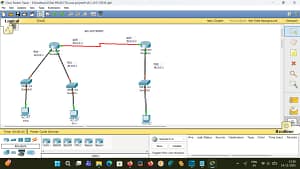


Extended ACL Configuration on Two Routers Using Serial Cable (2025)
Extended Acl list configuration two routers with serial cable with commands 2025
1. Introduction to Extended ACL
Extended Acl list configuration two routers with serial cable with commands 2025
An Extended Access Control List (ACL) is used to filter network traffic based on multiple conditions, such as:
- Source IP address
- Destination IP address
- Protocol (IP, TCP, UDP, ICMP)
- Port numbers (HTTP, FTP, SSH, etc.)
Why Extended ACL?
Extended ACLs provide fine-grained control compared to Standard ACLs.
Key Rule
Extended ACLs should be placed as close as possible to the source network.
2. Network Topology
Extended Acl list configuration two routers with serial cable with commands 2025
Devices Used
- 2 Routers (Cisco)
- 2 PCs
- 1 Serial DCE cable
- 2 Ethernet cables
Topology Diagram (Conceptual)
PC1 ---- R1 =====(Serial Cable)===== R2 ---- PC2
3. IP Addressing Scheme
Extended Acl list configuration two routers with serial cable with commands 2025
| Device | Interface | IP Address | Subnet Mask |
|---|---|---|---|
| PC1 | NIC | 192.168.1.10 | 255.255.255.0 |
| R1 | G0/0 | 192.168.1.1 | 255.255.255.0 |
| R1 | S0/0/0 | 10.0.0.1 | 255.255.255.252 |
| R2 | S0/0/0 | 10.0.0.2 | 255.255.255.252 |
| R2 | G0/0 | 192.168.2.1 | 255.255.255.0 |
| PC2 | NIC | 192.168.2.10 | 255.255.255.0 |
4. Objective of Extended ACL
Extended Acl list configuration two routers with serial cable with commands 2025


Scenario
- Allow PC1 (192.168.1.10) to access PC2 (192.168.2.10) using HTTP (port 80)
- Deny all other traffic
- Apply Extended ACL on Router R1
5. Basic Router Configuration
Extended Acl list configuration two routers with serial cable with commands 2025
5.1 Configure Router R1
Router> enable
Router# configure terminal
Router(config)# hostname R1
Configure LAN Interface
R1(config)# interface g0/0
R1(config-if)# ip address 192.168.1.1 255.255.255.0
R1(config-if)# no shutdown
Configure Serial Interface
R1(config)# interface s0/0/0
R1(config-if)# ip address 10.0.0.1 255.255.255.252
R1(config-if)# clock rate 64000
R1(config-if)# no shutdown
5.2 Configure Router R2
Router> enable
Router# configure terminal
Router(config)# hostname R2
Configure Serial Interface
R2(config)# interface s0/0/0
R2(config-if)# ip address 10.0.0.2 255.255.255.252
R2(config-if)# no shutdown
Configure LAN Interface
R2(config)# interface g0/0
R2(config-if)# ip address 192.168.2.1 255.255.255.0
R2(config-if)# no shutdown
6. Configure Static Routing
Extended Acl list configuration two routers with serial cable with commands 2025
On Router R1
R1(config)# ip route 192.168.2.0 255.255.255.0 10.0.0.2
On Router R2
R2(config)# ip route 192.168.1.0 255.255.255.0 10.0.0.1
7. Verify Basic Connectivity (Before ACL)
Extended Acl list configuration two routers with serial cable with commands 2025
Ping Test
From PC1:
ping 192.168.2.10
✔ Ping should succeed
8. Extended ACL Theory
Syntax
access-list <100-199> <permit|deny> <protocol> <source> <wildcard> <destination> <wildcard> [port]
Example
access-list 100 permit tcp 192.168.1.10 0.0.0.0 192.168.2.10 0.0.0.0 eq 80
9. Configure Extended ACL on Router R1
Extended Acl list configuration two routers with serial cable with commands 2025
Step 1: Create Extended ACL
R1(config)# access-list 100 permit tcp 192.168.1.10 0.0.0.0 192.168.2.10 0.0.0.0 eq 80
Step 2: Deny All Other Traffic
R1(config)# access-list 100 deny ip any any
⚠ Even though there is an implicit deny, explicit deny is best practice for clarity.
10. Apply Extended ACL to Interface
Extended ACL should be applied near the source, so apply it on R1 LAN interface (G0/0) inbound.
R1(config)# interface g0/0
R1(config-if)# ip access-group 100 in
11. Verify ACL Configuration
11.1 Check ACL
R1# show access-lists
11.2 Check Interface
R1# show ip interface g0/0
12. Testing the Extended ACL
Extended Acl list configuration two routers with serial cable with commands 2025
Test 1: HTTP Access (Allowed)
- Open browser on PC1
- Access
http://192.168.2.10
✔ Should work
Test 2: Ping (Denied)
ping 192.168.2.10
❌ Ping should fail (ICMP denied)
Test 3: FTP or SSH (Denied)
❌ Access blocked
13. Named Extended ACL (Optional – 2025 Best Practice)
Extended Acl list configuration two routers with serial cable with commands 2025

Create Named ACL
R1(config)# ip access-list extended WEB-ACCESS
R1(config-ext-nacl)# permit tcp host 192.168.1.10 host 192.168.2.10 eq 80
R1(config-ext-nacl)# deny ip any any
Apply Named ACL
R1(config)# interface g0/0
R1(config-if)# ip access-group WEB-ACCESS in
14. Common Mistakes & Troubleshooting
Extended Acl list configuration two routers with serial cable with commands 2025
Mistake 1: Wrong Direction
✔ Use in on source interface
Mistake 2: Wrong Wildcard Mask
- Subnet mask:
255.255.255.0 - Wildcard:
0.0.0.255
Mistake 3: Forgetting Routing
✔ Ensure static routes are configured
15. Remove or Modify ACL
Extended Acl list configuration two routers with serial cable with commands 2025
Remove ACL from Interface
R1(config)# interface g0/0
R1(config-if)# no ip access-group 100 in
Delete ACL
R1(config)# no access-list 100
16. Real-Time Use Cases
- Block social media traffic
- Allow only secure services
- Control department-wise access
- Improve network security
- Enterprise firewall rules
17. Interview Questions (Quick)
Q:
Why Extended ACL is placed near source?
A: To stop unwanted traffic early and save bandwidth.
Q: ACL range?
A: 100–199 & 2000–2699
18. Conclusion
Extended ACLs are powerful tools for network security and traffic control.
In this guide, you learned:
✔ Two-router serial configuration
✔ Static routing
✔ Extended ACL syntax
✔ Real-time implementation
✔ Verification & troubleshooting
If you want:
- Packet Tracer lab file
- Featured image
- Telugu version
- MCQs or interview questions
- HTML blog format
👉 Just tell me 👍
video link to click here
please subscribe my website to click here

ex 2
R0
Router(config)#access-list 110 deny tcp 10.0.0.0 0.255.255.255 host 40.0.0.3 eq www
Router(config)#access-list 110 permit tcp any any
Router(config)#access-list 110 permit icmp any any
Router(config)#int s1/0
Router(config-if)#ip access-group 110 out





