ACL LIST STATIC IP CONFIGURATION TWO ROUTERS WITH SERIAL CABLE WITH COMMANDS 2025

By pgollabala@gmail.com

Published On:

Β 

Β 

Β 

Β 

Join WhatsApp

Join Now

ACL LIST STATIC IP CONFIGURATION TWO ROUTERS WITH SERIAL CABLE WITH COMMANDS 2025

Below is a complete, step-by-step guide on configuring TWO ROUTERS with a SERIAL CABLE, STATIC IP addressing, and ACL (Access Control List) with full Cisco commands.
This is written in simple English, suitable for students, interviews, labs, CCNA practice, and real networking basics (2025).


TWO ROUTERS CONFIGURATION USING SERIAL CABLE

STATIC IP + ACL CONFIGURATION (WITH COMMANDS) – 2025 GUIDE


1. INTRODUCTION

ACL LIST STATIC IP CONFIGURATION TWO ROUTERS WITH SERIAL CABLE WITH COMMANDS 2025

n networking, connecting two routers using a serial cable is a classic and important concept.
It is commonly used in:

  • WAN (Wide Area Network)
  • ISP connections
  • CCNA / Network exams
  • Lab practice using Cisco Packet Tracer or real routers

In this guide, you will learn:

  • How to connect two routers using a serial cable
  • How to configure static IP addresses
  • How to configure static routing
  • How to configure ACL (Standard & Extended)
  • How to verify and troubleshoot the configuration

2. NETWORK TOPOLOGY (BASIC DESIGN)

ACL LIST STATIC IP CONFIGURATION TWO ROUTERS WITH SERIAL CABLE WITH COMMANDS 2025

PC1 ---- Router1 ===== Serial Cable ===== Router2 ---- PC2

Devices Used

  • Router1 (R1)
  • Router2 (R2)
  • PC1 (LAN1)
  • PC2 (LAN2)
  • Serial DCE/DTE cable

3. IP ADDRESSING SCHEME (STATIC IP)

ACL LIST STATIC IP CONFIGURATION TWO ROUTERS WITH SERIAL CABLE WITH COMMANDS 2025

LAN 1 (Router1 Side)

Device Interface IP Address Subnet
PC1 NIC 192.168.1.10 255.255.255.0
Router1 FastEthernet0/0 192.168.1.1 255.255.255.0

LAN 2 (Router2 Side)

Device Interface IP Address Subnet
PC2 NIC 192.168.2.10 255.255.255.0
Router2 FastEthernet0/0 192.168.2.1 255.255.255.0

Serial Link (WAN)

Router Interface IP Address Subnet
Router1 Serial0/0/0 10.0.0.1 255.255.255.252
Router2 Serial0/0/0 10.0.0.2 255.255.255.252

4. SERIAL CABLE DETAILS

ACL LIST STATIC IP CONFIGURATION TWO ROUTERS WITH SERIAL CABLE WITH COMMANDS 2025

  • One router must be DCE
  • One router must be DTE
  • DCE router requires clock rate

Check using:

show controllers serial 0/0/0

5. ROUTER 1 CONFIGURATION (R1)

ACL LIST STATIC IP CONFIGURATION TWO ROUTERS WITH SERIAL CABLE WITH COMMANDS 2025

Step 1: Enter Configuration Mode

enable
configure terminal
hostname R1

Step 2: Configure LAN Interface

interface fastEthernet0/0
ip address 192.168.1.1 255.255.255.0
no shutdown
exit

Step 3: Configure Serial Interface

interface serial0/0/0
ip address 10.0.0.1 255.255.255.252
clock rate 64000
no shutdown
exit

Step 4: Configure Static Route

ip route 192.168.2.0 255.255.255.0 10.0.0.2

6. ROUTER 2 CONFIGURATION (R2)

ACL LIST STATIC IP CONFIGURATION TWO ROUTERS WITH SERIAL CABLE WITH COMMANDS 2025

Step 1: Enter Configuration Mode

enable
configure terminal
hostname R2

Step 2: Configure LAN Interface

interface fastEthernet0/0
ip address 192.168.2.1 255.255.255.0
no shutdown
exit

Step 3: Configure Serial Interface

interface serial0/0/0
ip address 10.0.0.2 255.255.255.252
no shutdown
exit

Step 4: Configure Static Route

ip route 192.168.1.0 255.255.255.0 10.0.0.1

7. PC CONFIGURATION

PC1

  • IP: 192.168.1.10
  • Subnet: 255.255.255.0
  • Gateway: 192.168.1.1

PC2

  • IP: 192.168.2.10
  • Subnet: 255.255.255.0
  • Gateway: 192.168.2.1

8. TEST CONNECTIVITY (BEFORE ACL)

ACL LIST STATIC IP CONFIGURATION TWO ROUTERS WITH SERIAL CABLE WITH COMMANDS 2025

From PC1:

ping 192.168.2.10

From Router:

show ip route
show ip interface brief

9. WHAT IS ACL (ACCESS CONTROL LIST)

ACL LIST STATIC IP CONFIGURATION TWO ROUTERS WITH SERIAL CABLE WITH COMMANDS 2025

how to configure leased line two routers with serial cable with commands 2025

ACL is used to permit or deny traffic based on:

  • IP address
  • Protocol
  • Port number

Types of ACL

  1. Standard ACL – filters by source IP only
  2. Extended ACL – filters by source, destination, protocol, port

10. STANDARD ACL CONFIGURATION

ACL LIST STATIC IP CONFIGURATION TWO ROUTERS WITH SERIAL CABLE WITH COMMANDS 2025

Example:

❌ Block PC1 (192.168.1.10)
βœ… Allow all other traffic


Configure ACL on Router2 (Near Destination)

ACL LIST STATIC IP CONFIGURATION TWO ROUTERS WITH SERIAL CABLE WITH COMMANDS 2025

configure terminal
access-list 1 deny host 192.168.1.10
access-list 1 permit any

Apply ACL to interface:

interface serial0/0/0
ip access-group 1 in
exit

11. EXTENDED ACL CONFIGURATION

ACL LIST STATIC IP CONFIGURATION TWO ROUTERS WITH SERIAL CABLE WITH COMMANDS 2025

Example:

❌ Block only PING from PC1 to PC2
βœ… Allow everything else


Create Extended ACL on Router1 (Near Source)

ACL LIST STATIC IP CONFIGURATION TWO ROUTERS WITH SERIAL CABLE WITH COMMANDS 2025
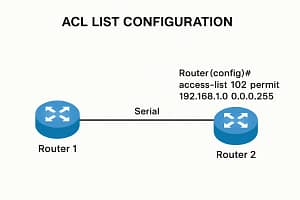
configure terminal
access-list 100 deny icmp host 192.168.1.10 host 192.168.2.10
access-list 100 permit ip any any

Apply ACL:

interface fastEthernet0/0
ip access-group 100 in
exit

12. VERIFY ACL

ACL LIST STATIC IP CONFIGURATION TWO ROUTERS WITH SERIAL CABLE WITH COMMANDS 2025

show access-lists
show ip interface serial0/0/0
show ip interface fastEthernet0/0

Test:

ping 192.168.2.10

13. REMOVE ACL (IF NEEDED)

ACL LIST STATIC IP CONFIGURATION TWO ROUTERS WITH SERIAL CABLE WITH COMMANDS 2025

configure terminal
no access-list 1
no access-list 100

Remove from interface:

interface fastEthernet0/0
no ip access-group 100 in

14. COMMON TROUBLESHOOTING

ACL LIST STATIC IP CONFIGURATION TWO ROUTERS WITH SERIAL CABLE WITH COMMANDS 2025

Serial Interface Down

  • Check no shutdown
  • Check clock rate
  • Check cable type

Ping Not Working

ACL LIST STATIC IP CONFIGURATION TWO ROUTERS WITH SERIAL CABLE WITH COMMANDS 2025

DHCP configuration two routers with serial cable with commands 2025
  • Verify IP address
  • Verify static routes
  • Check ACL rules order

15. IMPORTANT INTERVIEW QUESTIONS

  1. What is serial communication?
  2. Difference between DCE and DTE?
  3. Why clock rate is needed?
  4. Difference between standard and extended ACL?
  5. Where should we place ACL?

16. CONCLUSION

ACL LIST STATIC IP CONFIGURATION TWO ROUTERS WITH SERIAL CABLE WITH COMMANDS 2025
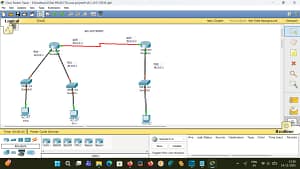
This guide explained two routers configuration using serial cable, static IP, static routing, and ACL configuration with clear commands.

This setup is very important for:

  • CCNA / Networking exams
  • Interview preparation
  • Real WAN understanding
  • Packet Tracer labs

If you want:

  • Cisco Packet Tracer file
  • Β 

πŸ‘‰ Just tell me πŸ‘

ACL LIST CONFIGURATION TWO ROUTERS WITH SERIAL CABLE WITH COMMANDS 2025

router r0 static configuration

=============
router>en
router#config t
router(config)#hostname r0
r0(config)#interface f0/0
r0(config-if)#ip add 10.0.0.1 255.0.0.0
r0(config-if)#no shutdown
r0(config-if)#exit

r0(config)#interface f0/1
r0(config-if)#ip add 20.0.0.1 255.0.0.0
r0(config-if)#no shutdown
r0(config-if)#exit

r0(config)#interface s1/0
r0(config-if)#ip add 30.0.0.1 255.0.0.0
r0(config-if)#clock rate 64000
r0(config-if)#no shutdown
r0(config-if)#exit

routing part

r0(config)#ip route 40.0.0.0 255.0.0.0 30.0.0.2
r0(config)#ip route 30.0.0.0 255.0.0.0 30.0.0.2
r0(config)#ip route 20.0.0.0 255.0.0.0 30.0.0.2
r0(config)#ip route 10.0.0.0 255.0.0.0 30.0.0.2
β€”β€”β€”β€”β€”β€”β€”β€”β€”β€”β€”β€”β€”β€”β€”β€”β€”β€”β€”β€”β€”β€”β€”β€”β€”

Β 

router r1
=================
router>en
router#config t
router(config)#hostname r1
r1(config)#interface f0/0
r1(config-if)#ip add 40.0.0.1 255.0.0.0
r1(config-if)#no shutdown
r1(config-if)#exit

r1(config)#interface s1/0
r1(config-if)#ip add 30.0.0.2 255.0.0.0
r1(config-if)#no shutdown
r1(config-if)#exit

routing part
=================β€”β€”β€”β€”β€”β€”β€”β€”β€”β€”β€”β€”-

standard Acl List configuration two routers with commands 2025

r1(config)#ip route 10.0.0.0 255.0.0.0 30.0.0.1
r1(config)#ip route 20.0.0.0 255.0.0.0 30.0.0.1

Β 

———————————————————————–

Β 

APPLICATION DOWNLOAD LINK

PLEASE SUBSCRIBE MY WEBSITE TO CLICK HERE

Β 

Β 

Β 

Β 

Β 

Leave a Comment
