


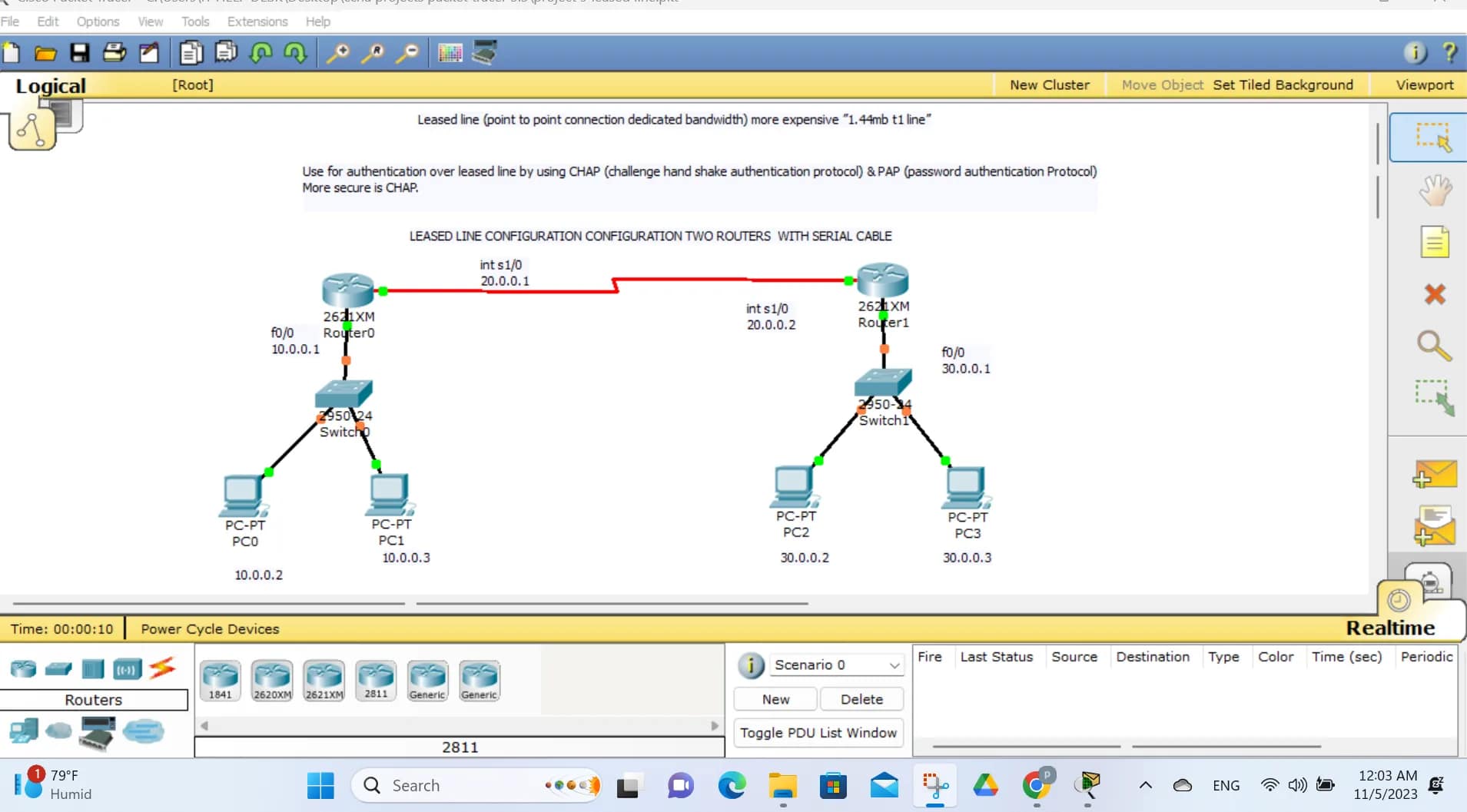
how to configure leased line two routers with serial cable with commands 2025
Leased Line Configuration Between Two Routers Using Serial Cable (2025)

how to configure leased line two routers with serial cable with commands 2025
1. What Is a Leased Line?

how to configure leased line two routers with serial cable with commands 2025Aleased line
is a dedicated, point-to-point communication link permanently reserved between two locations. Unlike broadband or shared networks, a leased line:
- Is always ON
- Provides fixed bandwidth
- Has low latency
- Is highly secure
- Uses point-to-point protocols
In router labs, leased lines are simulated using serial interfaces (DCE/DTE).
2. Real-World vs Lab Leased Line
| Real World | Lab Simulation |
|---|---|
| ISP fiber / copper | Serial cable |
| CSU/DSU | DCE interface |
| Monthly rental | No cost |
| SLA guaranteed | Manual clock rate |
3. Network Topology
   Router1 (R1) -------- Serial Cable -------- Router2 (R2)
         S0/0/0                         S0/0/0
4. Requirements
Hardware
- 2 Routers (Cisco 1841 / 2811 / ISR / Packet Tracer routers)
- 1 Serial DCE/DTE cable
Software
- Cisco IOS
- Packet Tracer / GNS3 / Real devices
5. IP Addressing Plan
| Device | Interface | IP Address | Subnet Mask |
|---|---|---|---|
| R1 | Serial0/0/0 | 10.10.10.1 | 255.255.255.252 |
| R2 | Serial0/0/0 | 10.10.10.2 | 255.255.255.252 |
/30 subnet is best for leased lines (only 2 usable IPs).
6. DCE vs DTE Explanation
| Term | Meaning |
|---|---|
| DCE | Provides clock rate |
| DTE | Receives clock |
| Clock Rate | Mandatory on DCE side |
Check DCE side
Router# show controllers serial 0/0/0
7. Router 1 Configuration (R1)
Step 1: Enter Privileged Mode
Router> enable
Step 2: Enter Global Configuration
Router# configure terminal
Step 3: Set Hostname
Router(config)# hostname R1
Step 4: Configure Serial Interface
R1(config)# interface serial 0/0/0
Step 5: Assign IP Address
R1(config-if)# ip address 10.10.10.1 255.255.255.252
Step 6: Set Clock Rate (Only if DCE)
R1(config-if)# clock rate 64000
Step 7: Set Encapsulation (PPP recommended)
R1(config-if)# encapsulation ppp
Step 8: Enable Interface
R1(config-if)# no shutdown
Step 9: Exit
R1(config-if)# exit
8. Router 2 Configuration (R2)
Step 1: Enter Privileged Mode
Router> enable
Step 2: Enter Global Configuration
Router# configure terminal
Step 3: Set Hostname
Router(config)# hostname R2
Step 4: Configure Serial Interface
R2(config)# interface serial 0/0/0
Step 5: Assign IP Address
R2(config-if)# ip address 10.10.10.2 255.255.255.252
Step 6: Set Encapsulation
R2(config-if)# encapsulation ppp
Step 7: Enable Interface
R2(config-if)# no shutdown
Step 8: Exit
R2(config-if)# exit
9. Verify Interface Status
Check Interface
R1# show ip interface brief
R2# show ip interface brief
Expected Output:
Serial0/0/0    10.10.10.1    up   up
Serial0/0/0    10.10.10.2    up   up
10. Test Connectivity
Ping Test
R1# ping 10.10.10.2
R2# ping 10.10.10.1
✔ Successful replies confirm leased line is working.
11. Optional: Enable Authentication (PPP CHAP)
Configure Username
R1(config)# username R2 password cisco
R2(config)# username R1 password cisco
Enable CHAP
R1(config)# interface serial 0/0/0
R1(config-if)# ppp authentication chap

R2(config)# interface serial 0/0/0
R2(config-if)# ppp authentication chap
12. Optional: Static Routing (If LANs Are Connected)
Example LANs
how to configure leased line two routers with serial cable with commands 2025
- R1 LAN: 192.168.1.0/24
- R2 LAN: 192.168.2.0/24
Static Routes
R1(config)# ip route 192.168.2.0 255.255.255.0 10.10.10.2
R2(config)# ip route 192.168.1.0 255.255.255.0 10.10.10.1
13. Common Troubleshooting Commands
show ip interface brief
show interfaces serial 0/0/0
show controllers serial 0/0/0
show running-config
debug ppp negotiation
14. Common Issues & Fixes
| Problem | Solution |
|---|---|
| Interface down | no shutdown |
| Line protocol down | Check encapsulation |
| No ping | Check IP & subnet |
| Clock error | Configure clock rate |
| Auth failure | Match CHAP username |
15. Real-World ISP Leased Line Notes (2025)
- Uses PPP or HDLC
- Clock rate managed by ISP
- SLA includes uptime (99.5%+)
- Static IPs provided
- Used by banks, data centers, enterprises
16. Interview Questions
- Why use /30 subnet for leased lines?
- Difference between DCE and DTE?
- PPP vs HDLC?
- What is clock rate?
- How to troubleshoot serial links?
17. Conclusion
A leased line using serial cable provides:
- Dedicated connectivity
- Stable performance
- Secure communication
- Enterprise-grade networking
This configuration is still relevant in 2025 for:
- CCNA/CCNP labs
- Networking training
- Interview preparation
- Packet Tracer simulations
If you want, I can also provide:
✔ Packet Tracer file
✔ Diagram image
✔ Three-router leased line
✔ Leased line with ACL
✔ Leased line with DHCP
Leased line (point to point connection dedicated bandwidth) more expensive ”1.44mb t1 line”


Use for authentication over leased line by using CHAP (challenge hand shake authentication protocol) & PAP (password authentication Protocol)
More secure is CHAP.
- Configure ip add & routing
- Ping and check (will be able to ping)
- Change hostname r0 & r1 on both router
- On r0
r0(config)#username r1 password cisco
r0(config)#int s1/0
r0(config-if)#encapsulation ppp
r0(config-if)#ppp authentication chap

- Ping and check (cant ping)
- On r1
r1(config)#username r0 password cisco
r1(config)#int s1/0
r1(config-if)#encapsulation ppp
r1(config-if)#ppp authentication chap
- Ping and check (will be able to ping)
- In the place of chap use pap and check(if you are not getting out put with pap use “pap chap”)





I am truly thankful to the owner of this web site who has shared this fantastic piece of writing at at this place. lüleburgaz nakliyeci
thanks and like share others
I’m all about bong88keonhacai. Good odds and smooth experience, gotta love it
thanks for like and share others