


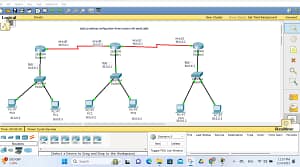
TELNET CONFIGURATION ON THREE ROUTERS USING SERIAL CABLES (2025 GUIDE)
how to configured telnet three routers with serial cableTelnet – Introductionhow to configured telnet three routers with serial cable commands 2025how to configured telnet three routers with serial cable commands 2025Telnet
is a network protocol used to remotely access and manage devices (like routers, switches, servers, or computers) over a TCP/IP network using a command-line interface (CLI).
Key Points About Telnet
- Works on TCP port 23
- Allows remote login to another device
- Commonly used in networking labs and training
- Requires username and password
- Sends data in plain text (not secure)
How Telnet Works
- A Telnet client sends a request to a Telnet server
- The server asks for login credentials
- After authentication, the user can run commands remotely
Example Use
- Configure Cisco routers and switches
- Troubleshoot network devices
- Manage systems from a remote location
Basic Telnet Command (Cisco)
telnet 192.168.1.1
Advantages
- Simple and easy to use
- Requires low system resources
- Useful for learning networking concepts
Disadvantages
- Not secure (passwords are visible)
- Vulnerable to sniffing and attacks
- Replaced by SSH in real-world networks
Telnet vs SSH
| Feature | Telnet | SSH |
|---|---|---|
| Security | ❌ No encryption | ✅ Encrypted |
| Port | 23 | 22 |
| Usage | Learning & labs | Real networks |
When to Use Telnet
- CCNA / networking practice
- Local lab environments
- Non-secure internal testing
When NOT to Use Telnet
- Public networks
- Production servers
- Internet-facing devices
If you want, I can also explain:
- Telnet configuration on routers
- Telnet commands
- Difference between Telnet and SSH
- Telnet lab setup (2 or 3 routers)
Just tell me 👍
1. NETWORK TOPOLOGY
how to configured telnet three routers with serial cable commands 2025
PC1 ---- Router1 ---- Router2 ---- Router3 ---- PC2
           S0/0/0      S0/0/0       S0/0/0
           S0/0/1      S0/0/1
Connections
- Router1 ↔ Router2 → Serial Cable
- Router2 ↔ Router3 → Serial Cable
- PCs connected via FastEthernet/GigabitEthernet
- Telnet access from PC or Router
2. IP ADDRESSING SCHEME
how to configured telnet three routers with serial cable
Router1
- G0/0:
192.168.1.1 /24 - S0/0/0:
10.0.12.1 /30
Router2
- S0/0/0:
10.0.12.2 /30 - S0/0/1:
10.0.23.1 /30
Router3
- S0/0/1:
10.0.23.2 /30 - G0/0:
192.168.3.1 /24
3. BASIC ROUTER CONFIGURATION (ALL ROUTERS)
how to configured telnet three routers with serial cable commands 2025
Disable DNS lookup
enable
configure terminal
no ip domain-lookup
4. ROUTER1 CONFIGURATION
Hostname
hostname Router1
GigabitEthernet Configuration
interface gigabitEthernet0/0
ip address 192.168.1.1 255.255.255.0
no shutdown
exit
Serial Interface
interface serial0/0/0
ip address 10.0.12.1 255.255.255.252
clock rate 64000
no shutdown
exit
5. ROUTER2 CONFIGURATION
hostname Router2
Serial Interfaces
interface serial0/0/0
ip address 10.0.12.2 255.255.255.252
no shutdown
exit
interface serial0/0/1
ip address 10.0.23.1 255.255.255.252
clock rate 64000
no shutdown
exit
6. ROUTER3 CONFIGURATION
how to configured telnet three routers with serial cable commands 2025
hostname Router3
Serial Interface
interface serial0/0/1
ip address 10.0.23.2 255.255.255.252
no shutdown
exit
GigabitEthernet
interface gigabitEthernet0/0
ip address 192.168.3.1 255.255.255.0
no shutdown
exit
7. STATIC ROUTING (REQUIRED FOR TELNET CONNECTIVITY)
how to configured telnet three routers with serial cable commands 2025
Router1
ip route 192.168.3.0 255.255.255.0 10.0.12.2
Router2
ip route 192.168.1.0 255.255.255.0 10.0.12.1
ip route 192.168.3.0 255.255.255.0 10.0.23.2
Router3
ip route 192.168.1.0 255.255.255.0 10.0.23.1
8. VERIFY CONNECTIVITY
ping 10.0.12.2
ping 10.0.23.2
ping 192.168.3.1
Ping must succeed before Telnet works
9. TELNET CONFIGURATION (ALL ROUTERS)
how to configured telnet three routers with serial cable


Set Enable Password
enable secret cisco123
Create Telnet User
username admin password telnet123
Configure VTY Lines
line vty 0 4
login local
transport input telnet
exec-timeout 10 0
exit
10. SECURE TELNET (OPTIONAL – RECOMMENDED)
Limit Telnet Access (ACL)
access-list 10 permit 192.168.1.0 0.0.0.255
line vty 0 4
access-class 10 in
exit
11. TELNET FROM ROUTER TO ROUTER
From Router1 to Router3
telnet 192.168.3.1
Enter:
- Username: admin
- Password: telnet123
12. TELNET FROM PC
how to configured telnet three routers with serial cable
PC IP
IP: 192.168.1.10
Gateway: 192.168.1.1
Command Prompt
telnet 192.168.3.1
13. VERIFY TELNET STATUS
show users
show line vty 0 4
show running-config | section vty
14. COMMON TELNET ERRORS & FIXES
how to configured telnet three routers with serial cable
| Problem | Solution |
|---|---|
| Telnet refused | Check transport input telnet |
| Password rejected | Verify login local |
| No route | Check static routes |
| Interface down | no shutdown |
| ACL blocking | Verify access-list |
15. SAVE CONFIGURATION
copy running-config startup-config
16. BEST PRACTICE (2025 NOTE)
⚠️ Telnet is NOT secure
✔ Use SSH in real networks
✔ Telnet is only for labs & learning
17. NEXT YOU CAN ASK
- SSH configuration (secure)
- Telnet with Extended ACL
- Packet Tracer file setup
- Diagram / featured image
- Telnet troubleshooting lab
- CCNA exam-style questions
If you want, I can also:
✔ Create a featured image
✔ Write this in Telugu
✔ Create a Packet Tracer lab file
Just tell me 👍
ex
Telnet from r0 to r2
On Router0

Router(config)#line vty 0 4
Router(config-line)#password bbb
Router(config-line)#login
Router(config-line)#enable password nnn
On Router2
Router(config)#line vty 0 4
Router(config-line)#password bbb
Router(config-line)#login
Router(config-line)#enable password nnn
On Router0

Router#telnet 40.0.0.2
Trying 40.0.0.2 …
User Access Verification
Password: bbb
Router>en
Password:nnn
Try to modify hostname configure some basic setting etc
video link
please subscribe link





