static ip configuration three routers with commands 2025static ip configuration three routers with commands 2025
✅ How to Configure Three Routers with Static IP Configuration Using Serial Cable (2025)
1. Introduction
static ip configuration three routers with commands 2025
In computer networking, connecting multiple routers using serial cables is a common method used in WAN (Wide Area Network) environments. Static IP configuration is often used in labs, small networks, testing environments, and learning scenarios because it is simple, predictable, and easy to troubleshoot.
In this guide, we will configure three routers connected serially with static IP addresses, verify connectivity, and troubleshoot common issues.
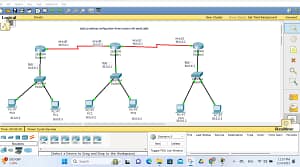
2. Network Topology Overview
static ip configuration three routers with commands 2025
static ip configuration three routers with commands 2025
📌 DCE vs DTE
DCE side provides clock rate
DTE side receives clock
👉 You must configure clock rate on the DCE interface
To check:
show controllers serial 0/0/0
5. Router-1 Configuration (R1)
static ip configuration three routers with commands 2025
Step 1: Enter Configuration Mode
enable
configure terminal
hostname R1
Step 2: Configure LAN Interface
interface gigabitEthernet0/0
ip address 192.168.1.1 255.255.255.0
no shutdown
exit
Step 3: Configure Serial Interface (R1 → R2)
interface serial0/0/0
ip address 10.0.0.1 255.255.255.252
clock rate 64000
no shutdown
exit
Step 4: Configure Static Routes
ip route 192.168.3.0 255.255.255.0 10.0.0.2
Step 5: Save Configuration
end
write memory
6. Router-2 Configuration (R2 – Middle Router)
static ip configuration three routers with commands 2025
Step 1: Basic Setup
enable
configure terminal
hostname R2
Step 2: Configure Serial Interface to R1
interface serial0/0/0
ip address 10.0.0.2 255.255.255.252
no shutdown
exit
Step 3: Configure Serial Interface to R3
interface serial0/0/1
ip address 10.0.0.5 255.255.255.252
clock rate 64000
no shutdown
exit
Step 4: Configure Static Routes
ip route 192.168.1.0 255.255.255.0 10.0.0.1
ip route 192.168.3.0 255.255.255.0 10.0.0.6
Step 5: Save Configuration
end
write memory
7. Router-3 Configuration (R3)
static ip configuration three routers with commands 2025
Step 1: Basic Setup
enable
configure terminal
hostname R3
Step 2: Configure LAN Interface
interface gigabitEthernet0/0
ip address 192.168.3.1 255.255.255.0
no shutdown
exit
Step 3: Configure Serial Interface
interface serial0/0/0
ip address 10.0.0.6 255.255.255.252
no shutdown
exit
Step 4: Configure Static Route
ip route 192.168.1.0 255.255.255.0 10.0.0.5
Step 5: Save Configuration
end
write memory
8. PC Configuration
static ip configuration three routers with commands 2025
PC-1
IP: 192.168.1.2
Subnet: 255.255.255.0
Gateway: 192.168.1.1
PC-2
IP: 192.168.3.2
Subnet: 255.255.255.0
Gateway: 192.168.3.1
9. Verification Commands (Very Important)
static ip configuration three routers with commands 2025
✔ Interface Status
show ip interface brief
✔ Routing Table
show ip route
✔ Test Connectivity
From PC1:
ping 192.168.3.2
From Router1:
ping 10.0.0.2
ping 10.0.0.6
10. Common Troubleshooting Issues
static ip configuration three routers with commands 2025
Problem
Solution
Serial link down
Check no shutdown
No ping
Verify static routes
Clock error
Configure clock rate
Wrong IP
Verify subnet mask
No routing
Check gateway on PC
11. Advantages of Static IP Routing
static ip configuration three routers with commands 2025
Simple to configure
No routing protocol overhead
Good for small networks
Predictable routing paths
12. Disadvantages
static ip configuration three routers with commands 2025
Not scalable
Manual configuration
Error-prone in large networks
No automatic failover
13. Real-World Use Cases
Small office WAN
ISP test labs
CCNA / CCNP practice
Network troubleshooting training
14. Interview Questions (Bonus)
What is a serial cable?
Difference between DCE and DTE?
Why clock rate is required?
What is static routing?
Why /30 subnet is used for serial links?
15. Conclusion
static ip configuration three routers with commands 2025
Configuring three routers using serial cables with static IP routing is a fundamental networking skill. It helps you understand WAN concepts, routing logic, IP planning, and troubleshooting techniques. This setup is still widely used in network labs, exams, and enterprise learning environments in 2025.
If you want next:
🔹 Same setup with ACL
2) st
Below is a clear, step-by-step guide to configure Static IP Routing on THREE routers using Cisco IOS commands.
This is suitable for CCNA / networking practice (2025).
🌐 Network Topology (Example)
static ip configuration three routers with commands 2025
PC1 ---- R1 ---- R2 ---- R3 ---- PC2
IP Address Plan
Device
Interface
IP Address
Subnet
R1
G0/0
192.168.1.1
/24
R1
S0/0/0
10.0.12.1
/30
R2
S0/0/0
10.0.12.2
/30
R2
S0/0/1
10.0.23.1
/30
R3
S0/0/1
10.0.23.2
/30
R3
G0/0
192.168.3.1
/24
🔹 Step 1: Configure Router-1 (R1)
enable
configure terminal
hostname R1

interface gigabitEthernet0/0
 ip address 192.168.1.1 255.255.255.0
 no shutdown
 exit

interface serial0/0/0
 ip address 10.0.12.1 255.255.255.252
 clock rate 64000
 no shutdown
 exit
Static Route on R1
(To reach R3 network)
ip route 192.168.3.0 255.255.255.0 10.0.12.2
🔹 Step 2: Configure Router-2 (R2)
enable
configure terminal
hostname R2

interface serial0/0/0
 ip address 10.0.12.2 255.255.255.252
 no shutdown
 exit

interface serial0/0/1
 ip address 10.0.23.1 255.255.255.252
 clock rate 64000
 no shutdown
 exit
Static Routes on R2
ip route 192.168.1.0 255.255.255.0 10.0.12.1
ip route 192.168.3.0 255.255.255.0 10.0.23.2
🔹 Step 3: Configure Router-3 (R3)
enable
configure terminal
hostname R3

interface serial0/0/1
 ip address 10.0.23.2 255.255.255.252
 no shutdown
 exit

interface gigabitEthernet0/0
 ip address 192.168.3.1 255.255.255.0
 no shutdown
 exit
Static Route on R3
static ip configuration three routers with commands 2025
(To reach R1 network)
ip route 192.168.1.0 255.255.255.0 10.0.23.1
🔍 Step 4: Verification Commands
Check Interfaces
show ip interface brief
Check Routing Table
show ip route
Test Connectivity
ping 192.168.3.1
ping 192.168.1.1
✅ Expected Result
✔ R1 can reach R3
✔ R3 can reach R1
✔ R2 routes traffic between both networks
✔ Static routing works successfully
It will ping only with the same Autonomous number for ex we have given 10 as autonomous no for all 3 router so all will ping if you give Autonomous no as 20 for r2 then r2 will not communicate with r0 & r1 if you add one more router r3 then you configure r3 with Autonomous no of 20 then r2 & r3 will communicate and r0 & r1 will communicate but r0 & r1 will not communicate with r2 & r3.