Three Routers Configuration Using Serial Port with Static IP (2025)
three routers configuration with serial port with static ip configuration with commands 2025
three routers configuration with serial port with static ip configuration with commands 2025This complete guide explains how to configure three routers connected via serial ports using static IP addressing, step by step, with Cisco IOS commands. This is useful for:
Networking students
CCNA preparation
Interview practice
Lab configuration (Packet Tracer / real routers)
1. Network Topology Overview
three routers configuration with serial port with static ip configuration with commands 2025
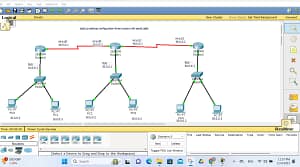
We will configure 3 routers connected in a linear topology using serial DCE/DTE cables.
three routers configuration with serial port with static ip configuration with commands 2025
LAN Networks
Device
Interface
IP Address
Subnet Mask
PC1
NIC
192.168.1.2
255.255.255.0
R1
G0/0
192.168.1.1
255.255.255.0
PC2
NIC
192.168.3.2
255.255.255.0
R3
G0/0
192.168.3.1
255.255.255.0
Serial Links
Link
Interface
IP Address
Subnet Mask
R1–R2
R1 S0/0/0
10.0.12.1
255.255.255.252
R1–R2
R2 S0/0/0
10.0.12.2
255.255.255.252
R2–R3
R2 S0/0/1
10.0.23.1
255.255.255.252
R2–R3
R3 S0/0/0
10.0.23.2
255.255.255.252
3. Hardware & Software Requirements
three routers configuration with serial port with static ip configuration with commands 2025
Cisco Routers (1841 / 2811 / 2911)
Serial DCE/DTE cables
PCs or laptops
Cisco Packet Tracer / GNS3
Cisco IOS
4. Basic Router Configuration (All Routers)
three routers configuration with serial port with static ip configuration with commands 2025
Perform these steps on each router.
enable
configure terminal
hostname R1   # Change for R2, R3
no ip domain-lookup
5. Router 1 (R1) Configuration
three routers configuration with serial port with static ip configuration with commands 2025
Configure LAN Interface
interface gigabitEthernet0/0
ip address 192.168.1.1 255.255.255.0
no shutdown
exit
Configure Serial Interface (DCE)
interface serial0/0/0
ip address 10.0.12.1 255.255.255.252
clock rate 64000
no shutdown
exit
6. Router 2 (R2) Configuration
three routers configuration with serial port with static ip configuration with commands 2025
Serial Interface to R1
interface serial0/0/0
ip address 10.0.12.2 255.255.255.252
no shutdown
exit
Serial Interface to R3 (DCE)
interface serial0/0/1
ip address 10.0.23.1 255.255.255.252
clock rate 64000
no shutdown
exit
7. Router 3 (R3) Configuration
three routers configuration with serial port with static ip configuration with commands 2025
Configure LAN Interface
interface gigabitEthernet0/0
ip address 192.168.3.1 255.255.255.0
no shutdown
exit
Configure Serial Interface
interface serial0/0/0
ip address 10.0.23.2 255.255.255.252
no shutdown
exit
8. Static Routing Configuration
three routers configuration with serial port with static ip configuration with commands 2025
Since we are using static IP routing, each router must know how to reach other networks.
Static Routes on Router 1
ip route 192.168.3.0 255.255.255.0 10.0.12.2
Static Routes on Router 2
ip route 192.168.1.0 255.255.255.0 10.0.12.1
ip route 192.168.3.0 255.255.255.0 10.0.23.2
Static Routes on Router 3
ip route 192.168.1.0 255.255.255.0 10.0.23.1
9. PC Configuration
three routers configuration with serial port with static ip configuration with commands 2025
PC1
IP: 192.168.1.2
Subnet Mask: 255.255.255.0
Default Gateway: 192.168.1.1
PC2
IP: 192.168.3.2
Subnet Mask: 255.255.255.0
Default Gateway: 192.168.3.1
10. Verification Commands
three routers configuration with serial port with static ip configuration with commands 2025
Check Interface Status
show ip interface brief
Check Routing Table
show ip route
Test Connectivity
ping 192.168.3.2
traceroute 192.168.3.2
11. Common Troubleshooting
three routers configuration with serial port with static ip configuration with commands 2025
Interface down → no shutdown
Wrong IP → check subnet
No ping → check static routes
Serial link down → verify clock rate
12. Advantages of Static Routing
three routers configuration with serial port with static ip configuration with commands 2025
Simple
Secure
Low overhead
Best for small networks
13. Disadvantages
three routers configuration with serial port with static ip configuration with commands 2025
Manual configuration
Not scalable
No automatic failover
14. Use Cases
three routers configuration with serial port with static ip configuration with commands 2025
CCNA labs
Interview demonstrations
Small office WAN
Educational purpose
15. Conclusion
three routers configuration with serial port with static ip configuration with commands 2025
This guide demonstrated three-router configuration using serial ports with static IP addressing in a clear, real‑world method. By following these steps, you can successfully build and troubleshoot WAN topologies in 2025 networking environments.